
best color analysis app
Best Color Analysis App
By the StyleCard Team · Last updated June 14, 2026
Compare color analysis app features, privacy tradeoffs, photo quality needs, and when StyleCard is the better first step.
Short answer
Choose a color analysis app that uses a clear photo workflow, explains its privacy practices, gives more than a season name, and turns the result into choices you can use while shopping.
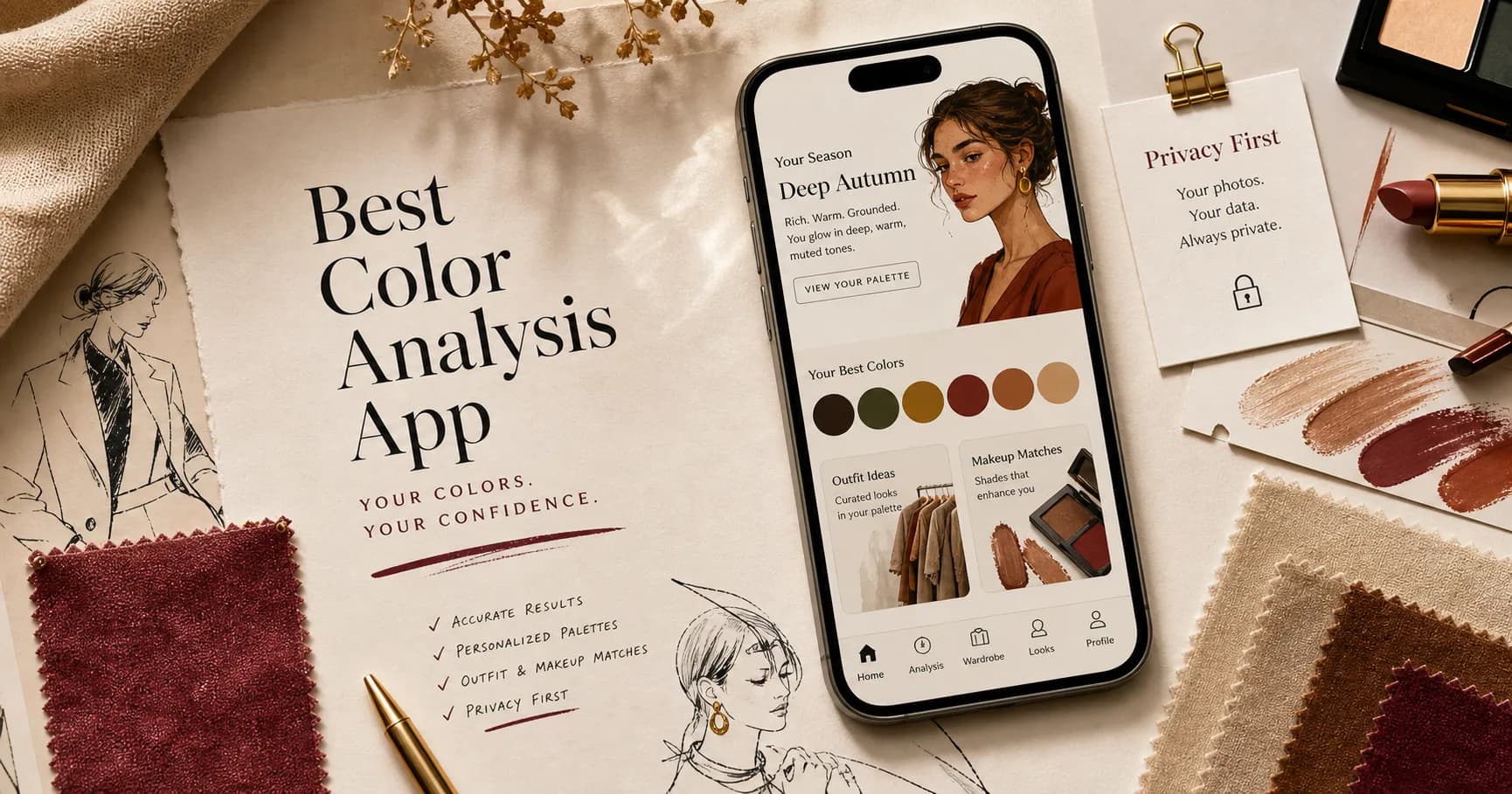
The best color analysis app depends on what you need. One person may want a digital palette fan for shopping. Another may want selfie analysis, makeup and hair try-on, closet planning, or something closer to an online consultation.
For StyleCard, the useful question is simpler: will the app give you practical color, outfit, makeup, and hair direction from one clear flow, and will it explain what happens to your photo?
What to compare
Start with output. A season label is not enough if you still do not know what to wear tomorrow. Look for best colors, neutrals, avoid colors, makeup direction, hair direction, outfit examples, and an easy way to save the result.
Then check input quality. Apps that ask for a selfie need natural light, no heavy filters, and a clear face. Apps that only ask quiz questions can be fast, but they depend on how accurately you judge yourself.
- Photo-based analysis: more personal, more sensitive to lighting.
- Quiz-only analysis: fast, but easy to mis-answer.
- Palette library: useful after you know your season.
- Styling output: strongest when it includes clothes, makeup, and hair.
App evaluation scorecard
Before choosing the best color analysis app for you, score the app by the job you need it to do. A digital palette fan can be excellent after you know your season, but it is weak if you still need diagnosis. A selfie app can feel personal, but it is weak if it accepts poor photos and gives no caveats.
The strongest apps combine a careful input workflow with practical output: colors, neutrals, avoid shades, makeup, hair, outfit examples, and a way to save or reuse the result while shopping.
- Photo workflow: gives natural-light instructions, warns against filters, and lets you retake poor photos.
- Method clarity: explains whether the result comes from quiz answers, selfie analysis, digital drapes, expert review, or a mix.
- Output usefulness: includes best colors, neutrals, avoid colors, makeup, hair, and outfit guidance.
- Privacy visibility: shows retention, deletion, training-use, account, analytics, and ad-data practices before upload.
- Pricing clarity: separates free preview, one-time report, in-app purchases, subscriptions, and ad-supported features.
- Verification support: gives colors to test in real life instead of asking you to trust one season label.
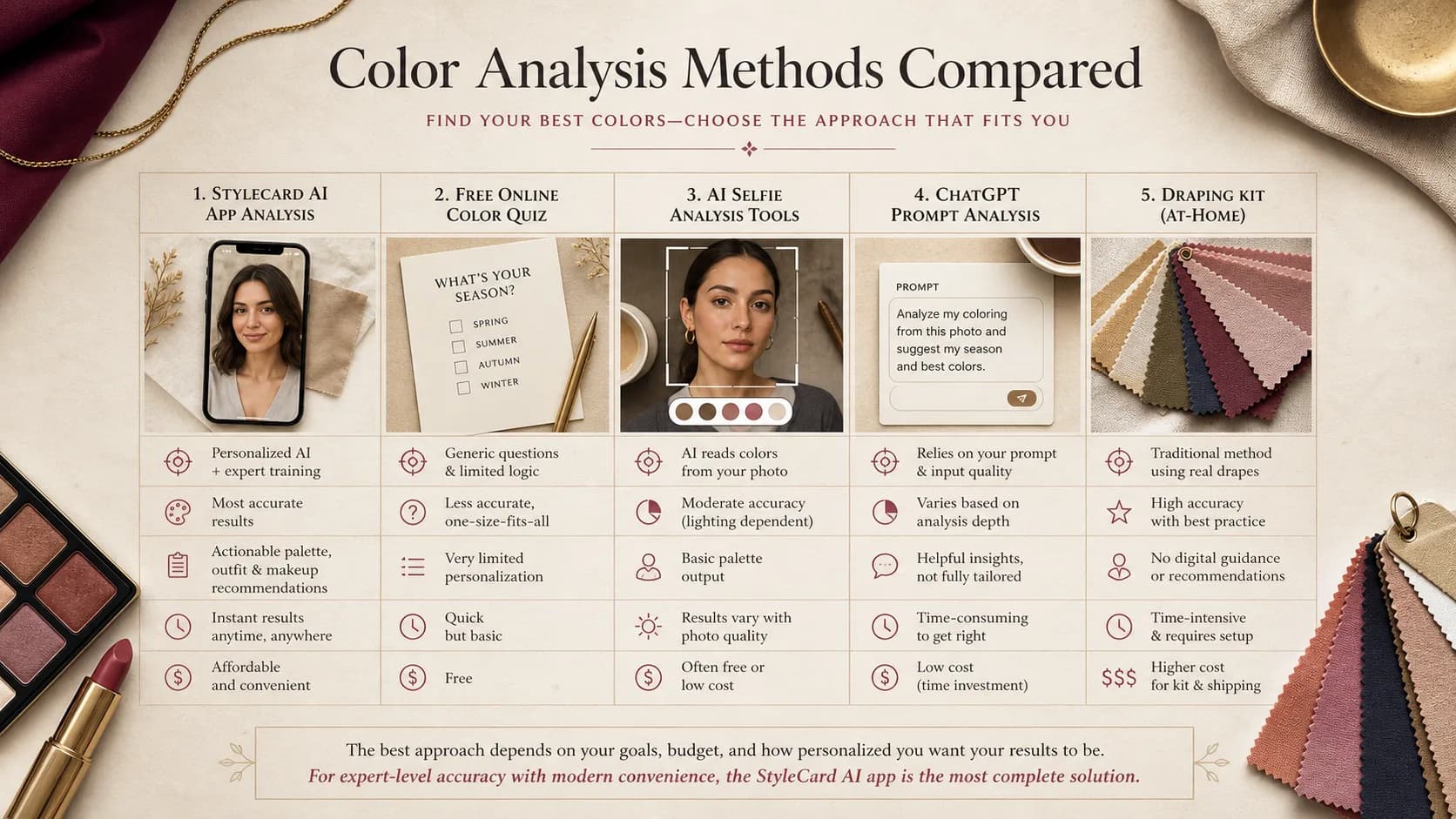
App vs quiz vs AI photo vs ChatGPT vs kit
A color analysis app can mean several different products. Some apps are mainly digital palette fans. Some start with a free quiz. Some use a selfie. Some bundle wardrobe planning, makeup try-on, or shopping tools. Before paying, identify which job you need the product to do.
A quiz is the fastest free entry point, but it depends on self-reporting. AI photo analysis can personalize the result, but only if the photo is clean. ChatGPT prompts can help you think through a palette, but they are weak when the input is one ambiguous selfie or a few hex codes. Draping kits give physical color comparison, but self-evaluation bias is still real.
- Fastest: quiz or ChatGPT prompt.
- Most personal without an appointment: AI photo analysis with clear photo instructions.
- Best after you know your season: digital palette fan or shopping color matcher.
- Best physical learning tool: fabric draping kit.
- Highest confidence: trained consultant under controlled lighting, with the highest cost and least convenience.
Free vs paid app criteria
A free color analysis app is enough when it helps you learn vocabulary, narrow warm vs cool, or test a few colors in your closet. A paid app or report becomes more reasonable when you need durable output: saved palettes, shopping support, makeup or hair advice, a clearer explanation of uncertainty, or personalized examples.
Watch the business model. Some apps are free because they are ad-supported. Some are free only until the result page. Some sell subscriptions for features you may use once. Others sell one report. None of those models is automatically wrong, but the pricing should be visible before you upload a sensitive photo.
- Choose free: you are curious, early, or validating whether color analysis helps at all.
- Choose one-time paid: you want a saved report or style cards you can use while shopping.
- Choose subscription carefully: only if you will repeatedly use closet, shopping, try-on, or palette-matching tools.
- Choose professional analysis: if multiple apps disagree and you need high-confidence draping.
Privacy should be visible before upload
A color analysis app may ask for a face photo, hair color, eye color, style preferences, and sometimes purchase data. Check the App Store or Google Play privacy disclosures, plus the app's own policy, before uploading.
StyleCard keeps the privacy promise visible in the flow: uploaded photos are scheduled for deletion after 24 hours, the preview is free, and the full Style Card Pack is a one-time $9.99 upgrade.
Do not assume an app-store privacy label has been independently verified. Read whether photos are stored, whether they are used for training, whether analytics or ad identifiers are collected, and whether you can delete the result.
Photo quality is part of the product
The best color analysis app should help you avoid bad inputs before it analyzes anything. Warm bathroom light, golden hour, beauty filters, heavy makeup, dyed hair around the face, and auto-enhanced selfies can all pull an analysis warmer, cooler, brighter, or softer than reality.
Use a front-facing or rear-camera photo in indirect natural light, no heavy filter, no sunglasses, no strong lipstick, and a neutral shirt. If hair is dyed a strong color, pull it back so the app can weigh skin, eyes, and contrast without the dye dominating the result.
- Use indirect daylight, not warm indoor light.
- Turn off beauty filters and avoid social-media screenshots.
- Keep face, neck, and hairline visible.
- Avoid colored walls, colored shirts, and heavy jewelry near the face.
- Retake the photo if the result changes wildly between uploads.
StyleCard vs a palette app
A palette app is useful if you already know your season and want a digital fan. StyleCard is better when you want the system to connect the dots: selfie, quiz answers, color direction, outfits, makeup, hair, and a shareable visual result.
That makes StyleCard a good first step before you buy a consultant appointment, a large palette library, or a full wardrobe guide.
Accuracy claims to treat carefully
Be cautious with any color analysis app that promises exact typing from one selfie, perfect accuracy, or a permanent identity-style label. There is little public independent benchmarking that compares consumer app outputs against blinded professional draping across lighting conditions, skin depths, olive undertones, and device types.
That does not mean apps are useless. It means the best app is the one that explains uncertainty, helps you submit a better photo, and gives practical tests. A transparent first-pass result is more trustworthy than a confident label with no method.
- Look for photo setup guidance before upload.
- Look for visible privacy and deletion language.
- Look for runner-up season or caveats for close calls.
- Look for verification colors, not just a palette name.
- Avoid apps that hide pricing or result details until after upload.
Best Color Analysis App evidence checklist
Best Color Analysis App should be judged by repeated evidence, not by one attractive swatch, one selfie, or one quiz answer. The strongest signal is consistency: the same color direction should make the face look clearer in daylight, make makeup easier, and make outfits feel more coherent.
Use this page with related guides such as AI color analysis, free color analysis, color analysis quiz, ChatGPT color analysis prompt. Cross-linking the evidence matters because color analysis is not just one category. A palette affects wardrobe neutrals, lipstick, hair color, metals, denim, and how much contrast an outfit can carry near the face.
For this topic, start with the practical test that matches the search intent: compare methods, check privacy and photo quality, then verify the result with real clothing, lipstick, jewelry, or consultant questions.
- Run the test in indirect daylight rather than warm bathroom light or golden hour.
- Remove strong lipstick, bronzer, filters, and saturated clothing when judging undertone.
- Compare neighboring possibilities directly instead of asking whether one label feels perfect.
- Keep notes on skin clarity, eye brightness, shadow, redness, and whether the color or your face gets attention.
- Use StyleCard as a photo-based preview, then keep only the guidance that survives real-world checks.
Best Color Analysis App practical next steps
After reading a guide like this, the next step should be small and testable. Do not replace a wardrobe, book a major salon change, or buy several products because one label sounded right. Start with one near-face color, one neutral, one metal, and one makeup cue.
If you are comparing tools, begin with the lowest-risk method that gives useful evidence. A free preview or quiz can narrow the field; a kit or consultant can resolve close calls; a paid report is most useful when it adds practical shopping, makeup, hair, and outfit guidance.
The most trustworthy result is flexible but not vague. It should say what to try, what to avoid, why the result might be uncertain, and how to confirm it. That is especially important for olive undertones, neutral coloring, deeper skin, dyed hair, gray hair, very muted palettes, and high-contrast palettes. If a recommendation cannot explain the tradeoff it is making, test again before spending money. A result should make repeat decisions easier, not just add a label.
- First purchase to test: one top, scarf, or lipstick in the likely palette.
- First closet move: move best colors near the face and weaker colors below the waist.
- First beauty move: test blush or lipstick before changing foundation or hair.
- First hair move: ask for a gloss, toner, or small shift before a dramatic multi-level change.
- First verification move: retake a clean photo and compare the result against real fabric.
- Final check: the guidance should improve at least three real choices, such as a neutral, a lip color, and a face-framing outfit.
A quick checklist before paying
Before paying for any app, look for a free preview or enough screenshots to understand the output. Check whether the result includes styling advice beyond a palette. Read the privacy language. Search reviews for complaints about inconsistent photo results.
If you mostly want a fast answer, start with a free StyleCard preview. If you later want a consultant or a larger palette library, you will have a clearer idea of what to ask for.
Try it on your photo
Try StyleCard before buying an app
Upload one selfie, see a free preview, and decide whether the full $9.99 style card pack is useful.
Try StyleCard before buying an appRelated StyleCard guides
FAQ
- What is the best color analysis app?
- The best app is the one that fits your goal. Use a palette app if you already know your season. Use a photo-based styling flow like StyleCard if you want color, outfit, makeup, and hair direction from one result.
- Are color analysis apps accurate?
- They can be useful for a first pass, but accuracy depends on photo quality, lighting, the app's method, and whether the result handles edge cases.
- What should I check before uploading a selfie?
- Check privacy disclosures, photo retention, whether photos are used for training, and whether the result can be deleted. StyleCard says photos auto-delete after 24 hours.
- Is a free color analysis app enough?
- It can be enough for a first pass if it gives useful colors to test. Upgrade only when the result explains why the palette fits, how to verify it, and what to do with clothing, makeup, or hair.
- Can ChatGPT replace a color analysis app?
- ChatGPT can help you explore a hypothesis or organize outfit ideas, but it is not a purpose-built color analysis workflow and can be thrown off by unclear images, lighting, filters, and overconfident prompt answers.
Sources
About the StyleCard Team
Our guides are written using established color analysis frameworks — including the seasonal color system and Munsell color theory — reviewed against practitioner and academic sources, and updated when research or product changes warrant a revision. See the Sources section above for the references used in this article.